
Lebanon · 5 min read
How do I add Arabic to my website?
The short answer
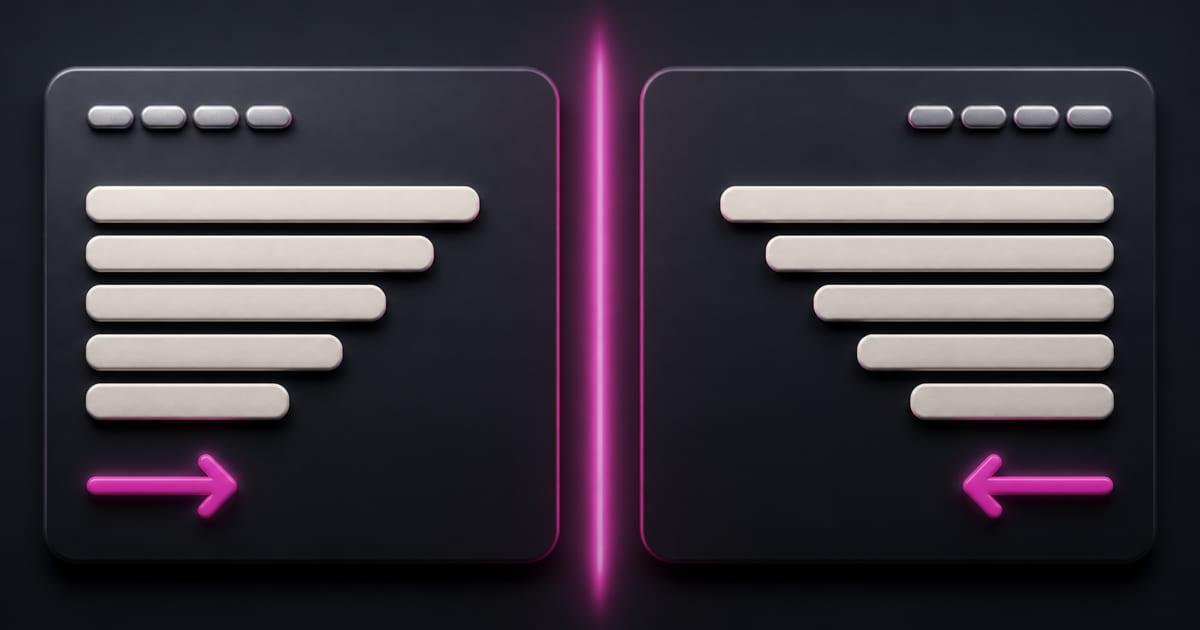
Not by translating the text. Arabic reads right to left, so the layout itself has to mirror — navigation, columns, icons, form fields, the direction arrows point. Pouring Arabic into a left-to-right design produces a page that is technically translated and visibly wrong. Add it as a language section of the same site, on the same domain, never as a separate site.
On this page
Translation is the smallest part
Most people asking this question are thinking about words. Getting a translator, running the copy, publishing.
The words are perhaps a fifth of the work. The rest is that Arabic reverses the page. Reading right to left is not a text setting; it is a different reading order for everything on the screen. A page that gets the words right and the direction wrong reads, to an Arabic speaker, the way a mirror-imaged English page would read to you: technically legible, obviously broken, and quietly telling them this version was an afterthought.
That impression is the commercial cost. It is not about polish. A visitor who can see the Arabic was bolted on assumes the business does not really serve them.
What gives it away is rarely one large error. It is a short set of specific failures repeated across most Arabic sites, and they are set out with a five-minute check in what goes wrong on Arabic websites.
What must mirror
The whole layout flips. Concretely:
- Navigation moves to the right, and its order reverses
- Columns and grids reverse — what was left is now right
- Text alignment goes right, including headings and lists
- Form fields and labels flip, and so does the field order in a row
- Directional arrows reverse — a "next" arrow must point left
- Progress indicators, breadcrumbs, carousels all run the other way
- Spacing — padding that was on the left belongs on the right; this is where half-done implementations give themselves away, with everything crowded to one side
What must not mirror
Getting this wrong is the other common failure, and it looks equally amateur.
- Numbers stay left to right. A phone number, a price, a date does not reverse.
- Latin brand names stay in Latin script. Your business name, and anyone else's. If a company is called Helm, it is Helm in the Arabic version too — you would not transliterate Wix, and the same rule applies to everyone.
- Logos do not flip.
- Icons that depict a real object — a clock, a camera, a padlock — stay as they are. Only directional icons reverse.
- Media controls mostly stay, because play buttons have a conventional direction people expect.
The two structural decisions
These are the ones that are expensive to reverse, so make them before anyone starts.
1. Same domain, always. The Arabic version belongs on your existing domain as a language section — yoursite.com/ar or similar. Not a separate domain, not a separate site.
A separate Arabic domain throws away every bit of authority your main domain has built, doubles the maintenance, and guarantees the two drift apart until one is wrong. This is the single most common expensive mistake, and it is covered in more detail in can I have two websites for one business.
2. Decide who maintains it. An Arabic version that only a developer can update will be out of date within a season, and a stale Arabic page is worse than none because it actively misinforms the customers you added it for.
This is the decision people skip, and it determines whether the investment survives the year.
The typography detail nobody mentions
Arabic needs its own typeface decisions, not the Arabic fallback of your Latin font.
Arabic script has different vertical proportions, so a size and line height tuned for Latin text produces Arabic that is cramped and hard to read. It usually needs slightly larger type and noticeably more line height. Sites that skip this are readable but tiring, and tiring costs you the second page.
It is a small amount of work at build time and effectively impossible to retrofit tastefully, which is why it is worth naming before anyone starts.
What good looks like
Five checks you can run in five minutes on any site claiming to support Arabic — including on a supplier's own portfolio:
- Is the navigation on the right?
- Do arrows point the correct way?
- Are phone numbers and prices still left to right?
- On a phone, is spacing symmetrical, or is everything shoved to one side?
- Are Latin brand names still in Latin script?
Any failure means the site was translated rather than built, and the same is almost certainly true of what you cannot see.
What this looks like in Helm
Helm builds both directions as one site rather than two. The layout mirrors properly, numerals and date formats stay correct, and the typography is chosen for Arabic rather than inherited from the Latin.
The part that decides whether it lasts is the editing. Each piece of text carries both languages together in the same place — you write the English, you write the Arabic, in one screen, and the Arabic input switches to right-to-left as you type. Nothing is machine-translated on your behalf, deliberately: a price list with one wrong word in it is worse than an honest gap.
So both versions change at the same moment, by the same person, which is the only arrangement where the Arabic side is still accurate in eighteen months. The company is London and Beirut, which is the practical reason this ended up built in rather than added as an option.
The short version
Mirror the layout, not just the text. Keep numbers and Latin names as they are. Put it on your existing domain as a language section. Choose Arabic typography deliberately. And make sure whoever updates the English can update the Arabic in the same action — otherwise you are building something that will be wrong by spring.