
The basics · 5 min read
Can I update my own website without a developer?
The short answer
Yes, if the site was built for it. What decides this is not the design or the technology — it is whether the parts that change often were wired to an editor when the site was made. On a site built that way, changing text, prices, photographs and opening hours takes a minute and needs no technical knowledge. On a site that was not, the same change is an email and a wait, however simple it looks.
On this page
The question behind the question
Almost nobody asking this wants to learn web development. They want to change a price, swap a photograph, correct the opening hours, add the new service, and take down the offer that finished in March.
So the real question is narrower and more useful: which parts of my site can I change, and how long does each one take?
That has a specific answer for every site, and it was decided when the site was built — not by how modern it looks or what it was built with.
Editing content is not editing a website
This is the distinction the whole subject turns on, and confusing the two is why people end up with the wrong thing.
Editing content means changing what a page says: the words, the pictures, the prices, the hours, the items on a menu. It is safe by definition, because the structure is fixed and you are filling it in. Nothing you type can break the layout.
Editing a website means changing what the page is: moving sections, changing the layout, adding a page type that did not exist. It is powerful and it is how sites get broken, which is why a good arrangement does not hand it to someone who does not want it.
Website builders sell you the second and call it freedom. In practice most people use about four per cent of it, spend an afternoon fighting a drag-and-drop grid, and end up with something that looks like a template because the design work was quietly outsourced to them.
The better arrangement is that a designer makes the design decisions once, and you own everything inside them permanently.
What a good editor actually feels like
Concretely, here is what editing your own site looks like when it was built for it. This is Helm's editor, described plainly so you can compare it to whatever you are being offered.
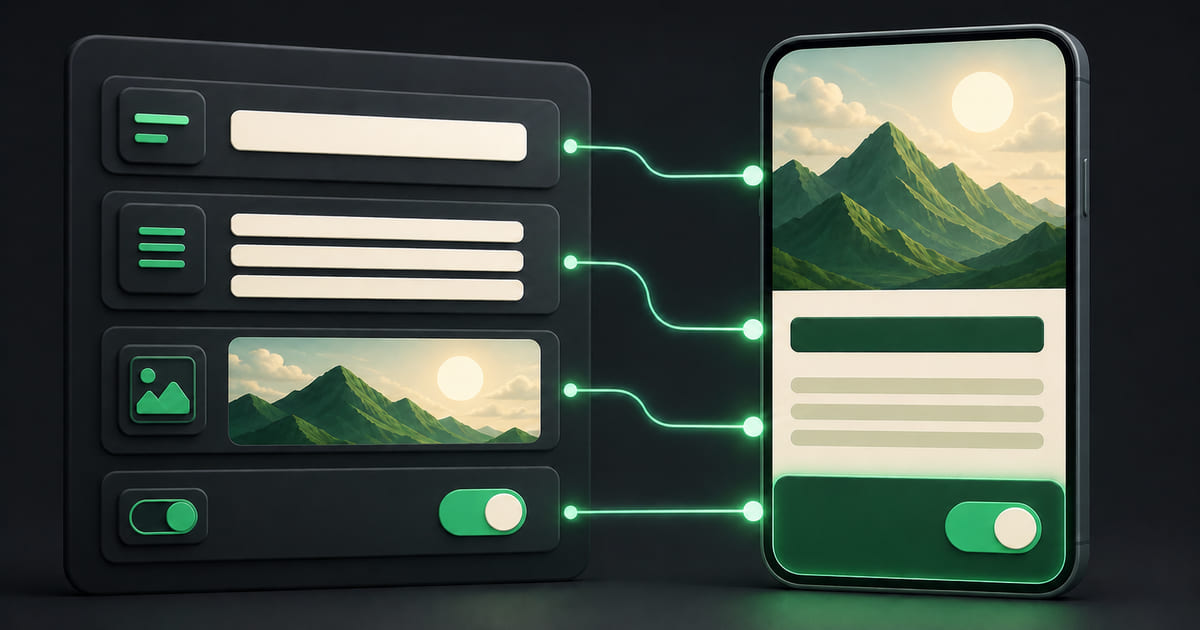
You pick a page, then a section from a list down the side — Hero, Menu, About, Contact. The middle of the screen shows that section's fields, in plain language, one under another: a headline box with a character counter, a paragraph, an image you drag a file onto, a toggle for whether something shows at all. Repeating things — menu items, team members, rooms, services — are a list you can reorder by dragging, where each entry has its own small set of fields.
Beside it is a live preview of your actual site, with a mobile view, so you watch the change land as you type rather than discovering it afterwards.
It saves as you go. Nothing is public until you press Go Live, which first shows you a list of exactly which sections you changed. And there is a version history — if you make a mess, you load a previous version back.
Three things are worth noticing about that description, because they are the things that separate an editor someone actually uses from one they are afraid of.
You cannot break it. The fields are the fields. There is no way to accidentally delete the layout or leave the page half-built, because the structure is not yours to move.
You see it before anyone else does. Editing blind — save, then check the live site on your phone, then fix what wrapped badly — is how people learn to dread updating their own website.
Publishing is deliberate. A change is not live because you typed it. It is live because you decided it was ready.
Both languages, if you run in both
If your site is in Arabic and English, this is where most arrangements fall apart: two versions, two places to edit, and one of them permanently out of date.
In Helm each piece of text carries both languages together in the same place — you write the English, you write the Arabic, in one screen, and the Arabic input switches to right-to-left as you type. Nothing is machine-translated on your behalf, because a translated price list with a wrong word in it is worse than an honest gap.
Who is allowed to do it
A practical detail people only think about after something goes wrong: not everybody who works for you should be able to publish.
Roles cover this. An Editor can change content and put it live. A Viewer can look and not touch. The owner keeps the account. So the person who knows the hours can change the hours, and the intern can be shown the analytics without being one click from the homepage.
How to tell which kind of site you have
If you already have a site and you are not sure, this takes about five minutes.
- Ask whoever built it: "which things can I change myself, and where?" A specific answer is a good sign. A vague one usually means the honest answer is "none of them".
- Try to change one price or one line of text. Time it.
- Ask what happens if you get it wrong. If there is no way back, that is the reason you are hesitant to touch it, and it is a real one.
If the answer is that everything goes through someone else, that is not a fault in you and it is not necessarily a fault in them. It is what the site was built as. It just costs more than anyone told you — not in invoices, but in the accumulated weight of every small thing you left wrong because fixing it was a whole undertaking.
The honest summary
You do not need to be technical to run your own website. You need a website that was built on the assumption that you would want to.
Ask the question before the site is built, not after: what can I change myself, and what will always need you? Anyone good has a clear answer ready, and the answer tells you more about the next three years than the design ever will.